该笔记学习b站视频制作而成:OAuth2
1. 简介
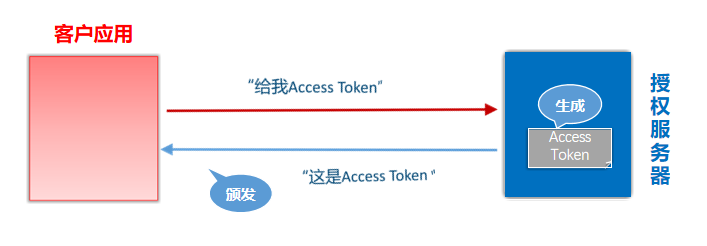
OAuth2是一种开放授权协议。,使应用程序能够访问其它公司提供的资源,允许用户在第三方应用访问存储在其他服务器上的私密资源,而在整个过程不需要提供用户名和密码给到第三方应用,可以通过提供一个令牌(token)实现该功能
OAuth2协议包含以下角色:
- 资源所有者(Resource Owner):即用户,资源的拥有人,想要通过客户应用访问资源服务器上的资源。
- 客户应用(Client):通常是一个Web或者无线应用,它需要访问用户的受保护资源。
- 资源服务器(Resource Server):存储受保护资源的服务器或定义了可以访问到资源的API,接收并验证客户端的访问令牌,以决定是否授权访问资源。
- 授权服务器(Authorization Server):负责验证资源所有者的身份并向客户端颁发访问令牌。
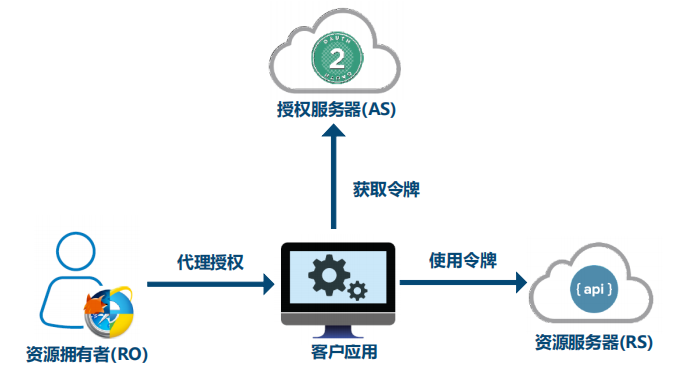
OAuth2的使用场景
开放系统间授权
社交登录
在传统的身份验证中,用户需要提供用户名和密码,还有很多网站登录时,允许使用第三方网站的身份,这称为”第三方登录”。所谓第三方登录,实质就是 OAuth 授权。用户想要登录 A 网站,A 网站让用户提供第三方网站的数据,证明自己的身份。获取第三方网站的身份数据,就需要 OAuth 授权。
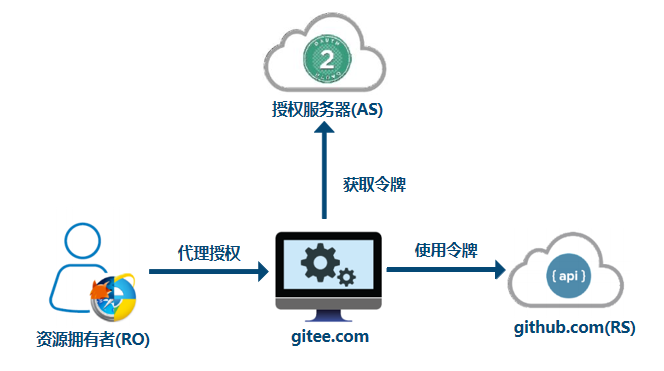
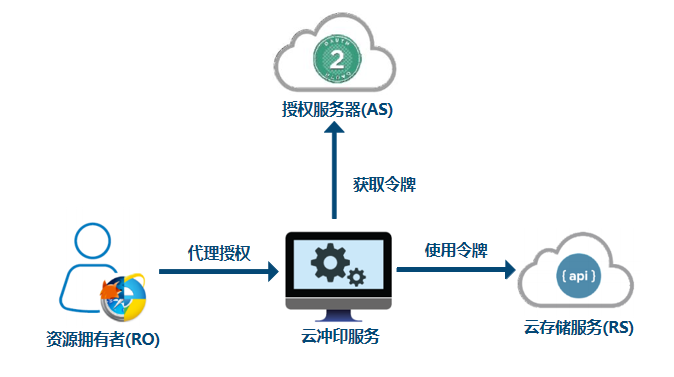
开放API
例如云冲印服务的实现
现代微服务安全
单块应用安全
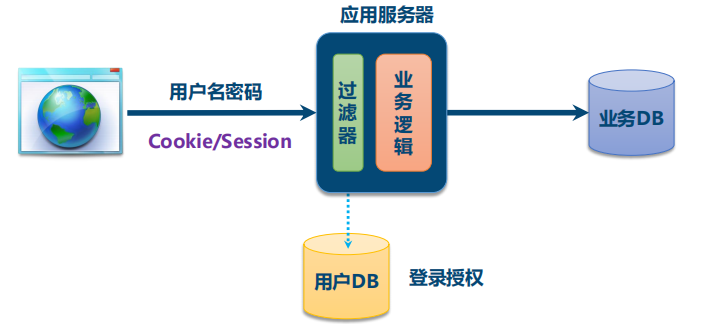
微服务安全
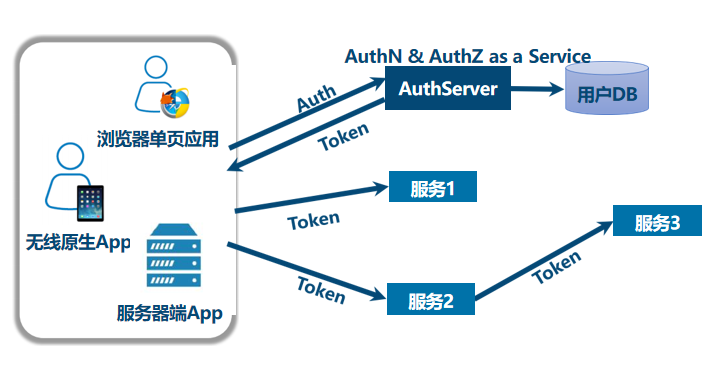
企业内部应用认证授权
2. 四种授权模式
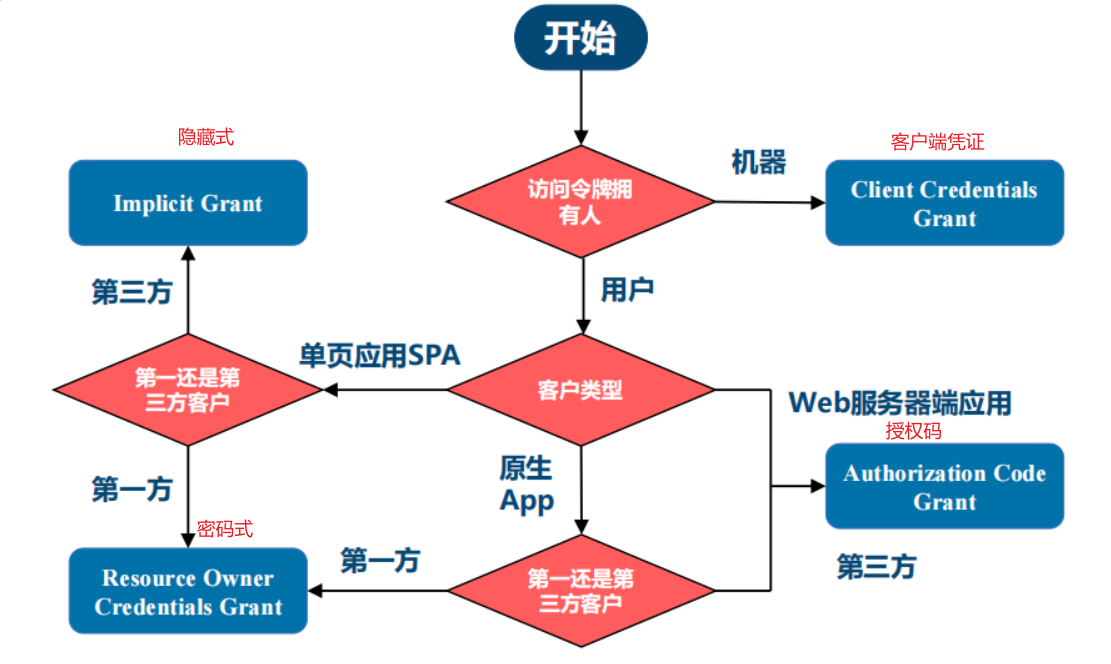
- 授权码(authorization-code)
- 隐藏式(implicit)
- 密码式(password)
- 客户端凭证(client credentials)
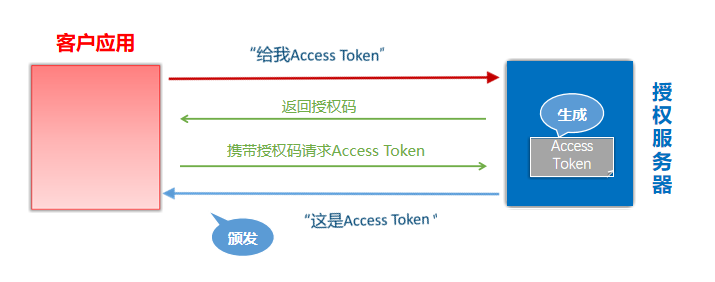
授权码
授权码(authorization code),指的是第三方应用先申请一个授权码,然后再用该码获取令牌。
这种方式是最常用,最复杂,也是最安全的,它适用于那些有后端的 Web 应用。授权码通过前端传送,令牌则是储存在后端,而且所有与资源服务器的通信都在后端完成。这样的前后端分离,可以避免令牌泄漏。
隐藏式
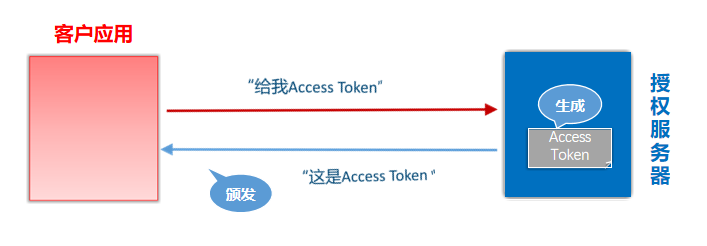
隐藏式(implicit),也叫简化模式,有些 Web 应用是纯前端应用,没有后端。这时就不能用上面的方式了,必须将令牌储存在前端
RFC 6749 规定了这种方式,允许直接向前端颁发令牌。这种方式没有授权码这个中间步骤,所以称为隐藏式。这种方式把令牌直接传给前端,是很不安全的。因此,只能用于一些安全要求不高的场景,并且令牌的有效期必须非常短,通常就是会话期间(session)有效,浏览器关掉,令牌就失效了
密码式
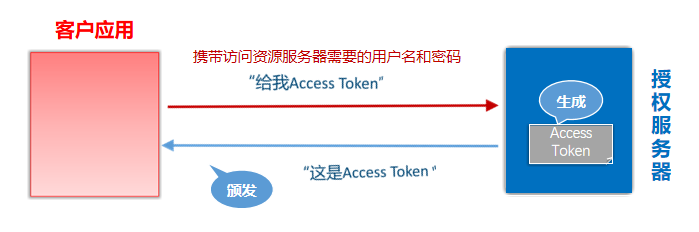
密码式(Resource Owner Password Credentials):如果你高度信任某个应用,RFC 6749 也允许用户把用户名和密码,直接告诉该应用。该应用就使用你的密码,申请令牌
这种方式需要用户给出自己的用户名/密码,显然风险很大,因此只适用于其他授权方式都无法采用的情况,而且必须是用户高度信任的应用
凭证式
凭证式(client credentials):也叫客户端模式,适用于没有前端的命令行应用,即在命令行下请求令牌。
这种方式给出的令牌,是针对第三方应用的,而不是针对用户的,即有可能多个用户共享同一个令牌
3. 授权模式的选择
4. Spring中OAuth2的实现
官方文档:OAuth2 :: Spring Security
Spring Security
- 客户应用(OAuth2 Client):OAuth2客户端功能中包含OAuth2 Login
- 资源服务器(OAuth2 Resource Server)
Spring
- 授权服务器(Spring Authorization Server):它是在Spring Security之上的一个单独的项目。
相关依赖
1
2
3
4
5
6
7
8
9
10
11
12
13
14
15
16
17
|
<dependency>
<groupId>org.springframework.boot</groupId>
<artifactId>spring-boot-starter-oauth2-resource-server</artifactId>
</dependency>
<dependency>
<groupId>org.springframework.boot</groupId>
<artifactId>spring-boot-starter-oauth2-client</artifactId>
</dependency>
<dependency>
<groupId>org.springframework.boot</groupId>
<artifactId>spring-boot-starter-oauth2-authorization-server</artifactId>
</dependency>
|
5. Github授权登录案例
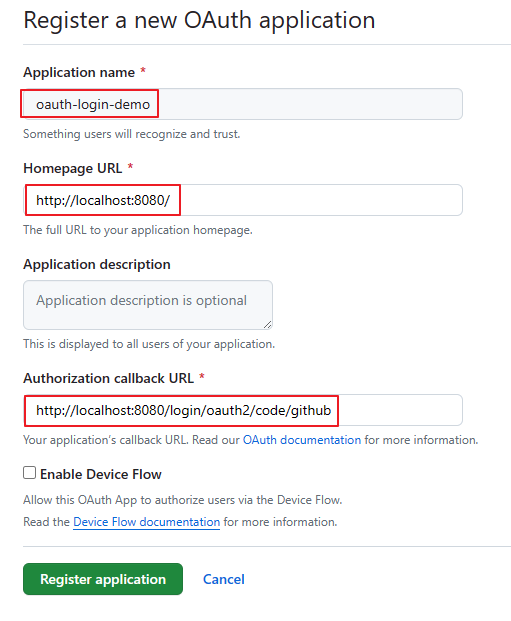
登录GitHub,在开发者设置(点击用户头像,选择settings)中找到OAuth Apps,创建一个application,为客户应用创建访问GitHub的凭据:

填写应用信息:默认的重定向URI模板为{baseUrl}/login/oauth2/code/{registrationId}。registrationId是ClientRegistration的唯一标识符
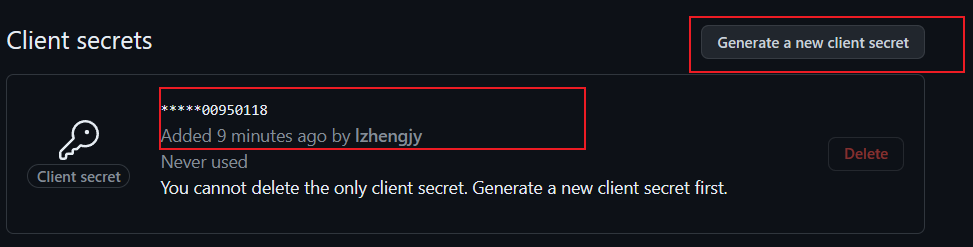
获取应用程序id,生成应用程序密钥:
生成后记得保存程序密钥,不然保存配置后密钥就会隐藏前面的数字
创建测试项目
引入相关的依赖
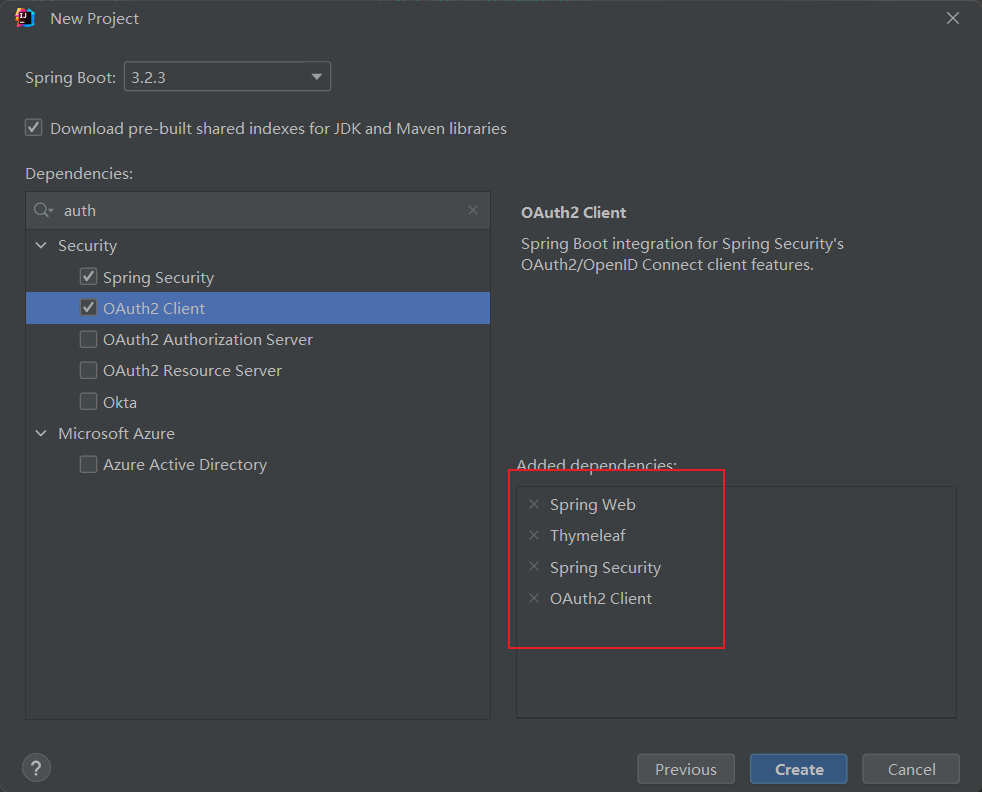
官方代码参考案例:示例代码参考:spring-security-samples/servlet/spring-boot/java/oauth2/login at 6.2.x · spring-projects/spring-security-samples (github.com)
在application.yml中写入相关配置
1
2
3
4
5
6
7
8
| spring:
security:
oauth2:
client:
registration:
github:
client-id: a9f7db7266f11042e686
client-secret: a9ef5aef572ac17ec6d45a5bbad909ca00950118
|
创建controller
1
2
3
4
5
6
7
8
9
10
11
12
13
14
15
16
17
18
19
20
21
22
23
| import org.springframework.security.core.annotation.AuthenticationPrincipal;
import org.springframework.security.oauth2.client.OAuth2AuthorizedClient;
import org.springframework.security.oauth2.client.annotation.RegisteredOAuth2AuthorizedClient;
import org.springframework.security.oauth2.core.user.OAuth2User;
import org.springframework.stereotype.Controller;
import org.springframework.ui.Model;
import org.springframework.web.bind.annotation.GetMapping;
@Controller
public class IndexController {
@GetMapping("/")
public String index(
Model model,
@RegisteredOAuth2AuthorizedClient OAuth2AuthorizedClient authorizedClient,
@AuthenticationPrincipal OAuth2User oauth2User) {
model.addAttribute("userName", oauth2User.getName());
model.addAttribute("clientName", authorizedClient.getClientRegistration().getClientName());
model.addAttribute("userAttributes", oauth2User.getAttributes());
return "index";
}
}
|
创建index页面
1
2
3
4
5
6
7
8
9
10
11
12
13
14
15
16
17
18
19
20
21
22
23
24
25
26
27
28
29
30
31
32
33
34
| <!DOCTYPE html>
<html xmlns="http://www.w3.org/1999/xhtml" xmlns:th="https://www.thymeleaf.org" xmlns:sec="https://www.thymeleaf.org/thymeleaf-extras-springsecurity5">
<head>
<title>Spring Security - OAuth 2.0 Login</title>
<meta charset="utf-8" />
</head>
<body>
<div style="float: right" th:fragment="logout" sec:authorize="isAuthenticated()">
<div style="float:left">
<span style="font-weight:bold">User: </span><span sec:authentication="name"></span>
</div>
<div style="float:none"> </div>
<div style="float:right">
<form action="#" th:action="@{/logout}" method="post">
<input type="submit" value="Logout" />
</form>
</div>
</div>
<h1>OAuth 2.0 Login with Spring Security</h1>
<div>
You are successfully logged in <span style="font-weight:bold" th:text="${userName}"></span>
via the OAuth 2.0 Client <span style="font-weight:bold" th:text="${clientName}"></span>
</div>
<div> </div>
<div>
<span style="font-weight:bold">User Attributes:</span>
<ul>
<li th:each="userAttribute : ${userAttributes}">
<span style="font-weight:bold" th:text="${userAttribute.key}"></span>: <span th:text="${userAttribute.value}"></span>
</li>
</ul>
</div>
</body>
</html>
|
启动程序
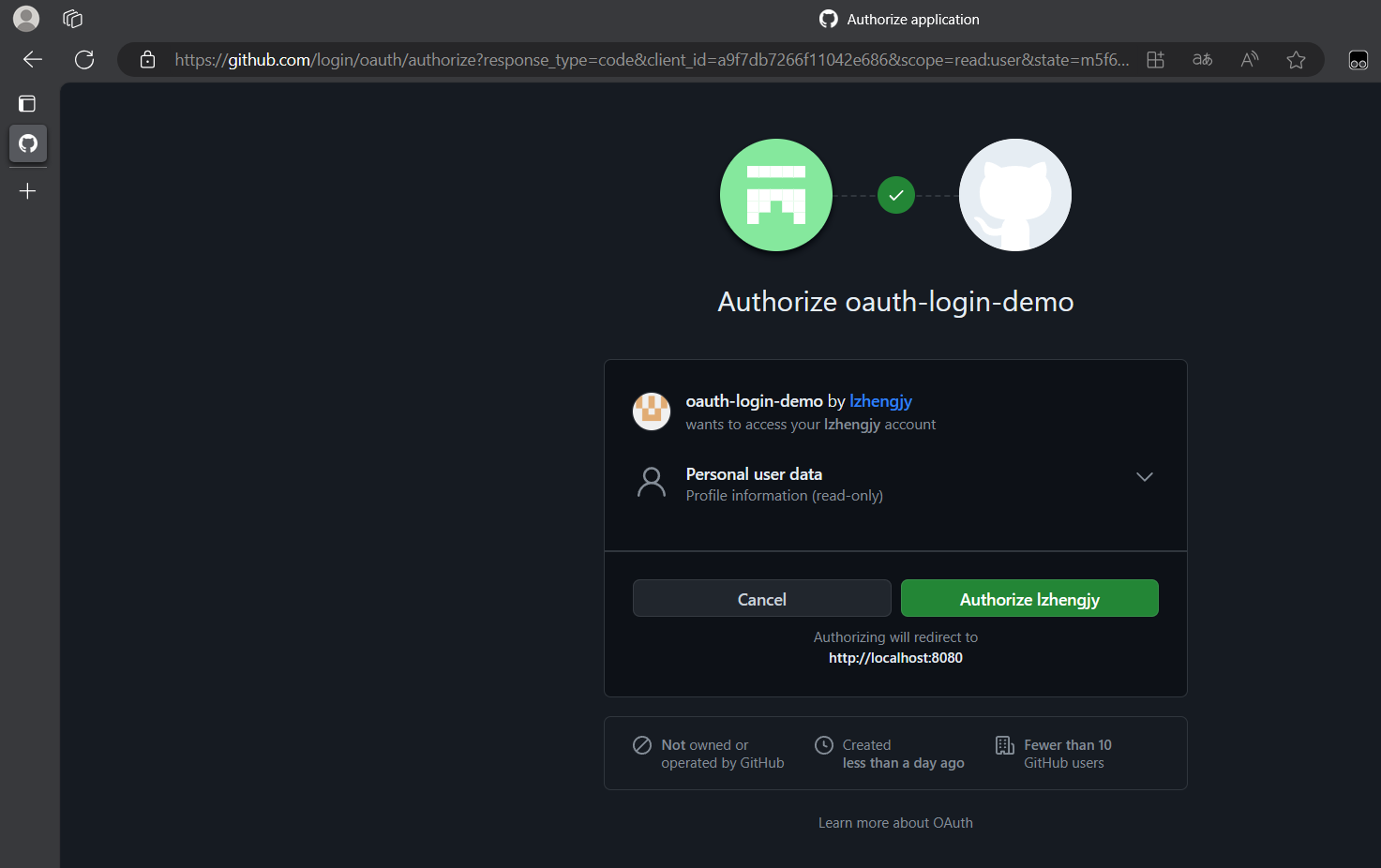
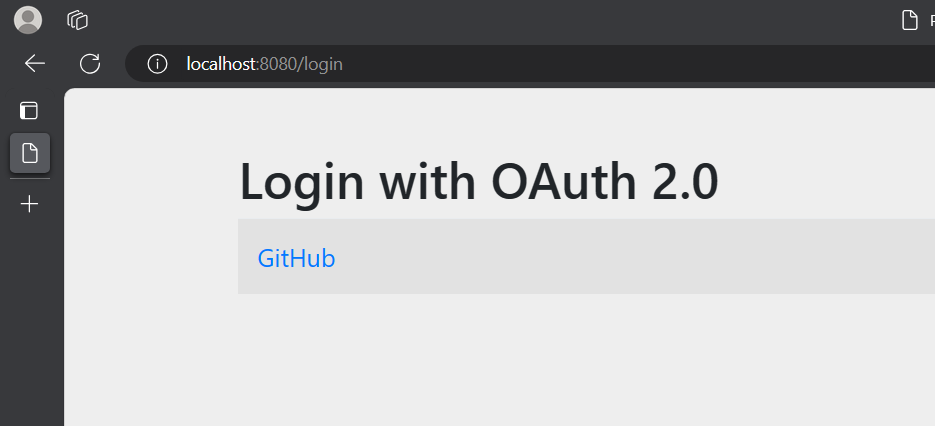
- 启动程序并访问localhost:8080。浏览器将被重定向到默认的自动生成的登录页面,该页面显示了一个用于GitHub登录的链接。
- 点击GitHub链接,浏览器将被重定向到GitHub进行身份验证。
- 使用GitHub账户凭据进行身份验证后,用户会看到授权页面,询问用户是否允许或拒绝客户应用访问GitHub上的用户数据。点击允许以授权OAuth客户端访问用户的基本个人资料信息。
- 此时,OAuth客户端访问GitHub的获取用户信息的接口获取基本个人资料信息,并建立一个已认证的会话。
访问localhost:8080,会直接跳转到github授权登录页面
访问localhost:8080/login
点击GIthub登录
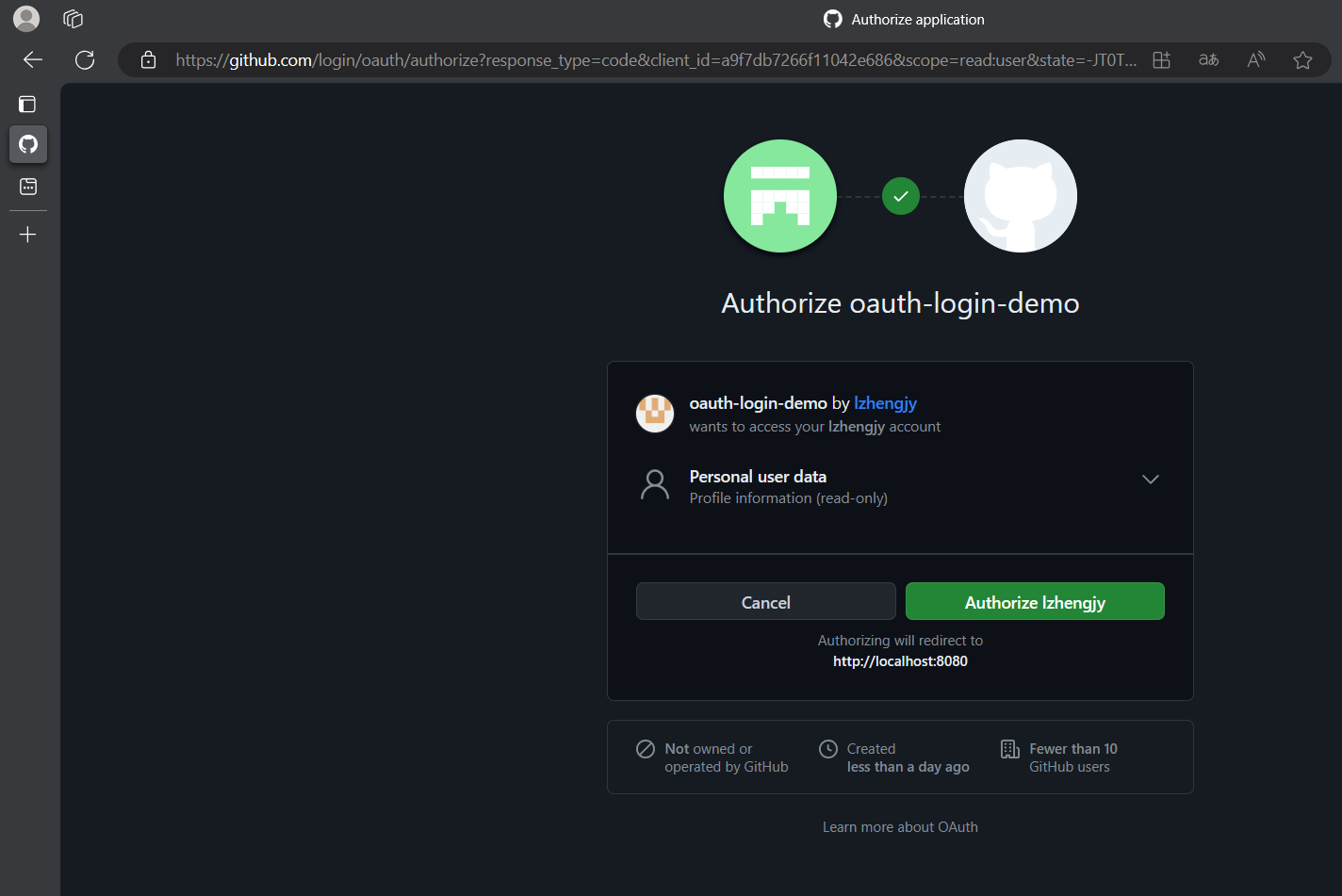
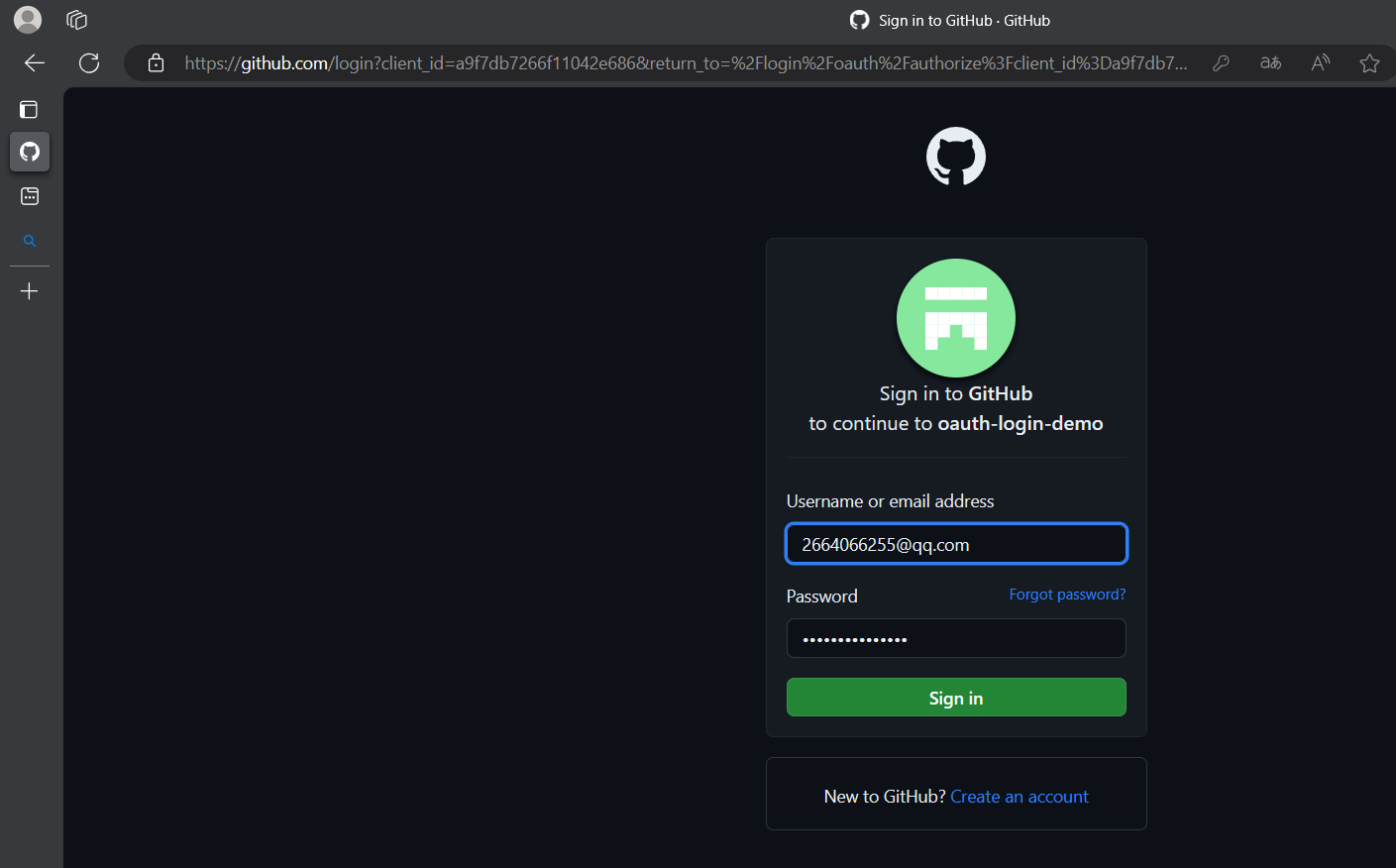
上面这种直接显示账号是因为我已经在Github登录了
退出GIthub后再次测试登录
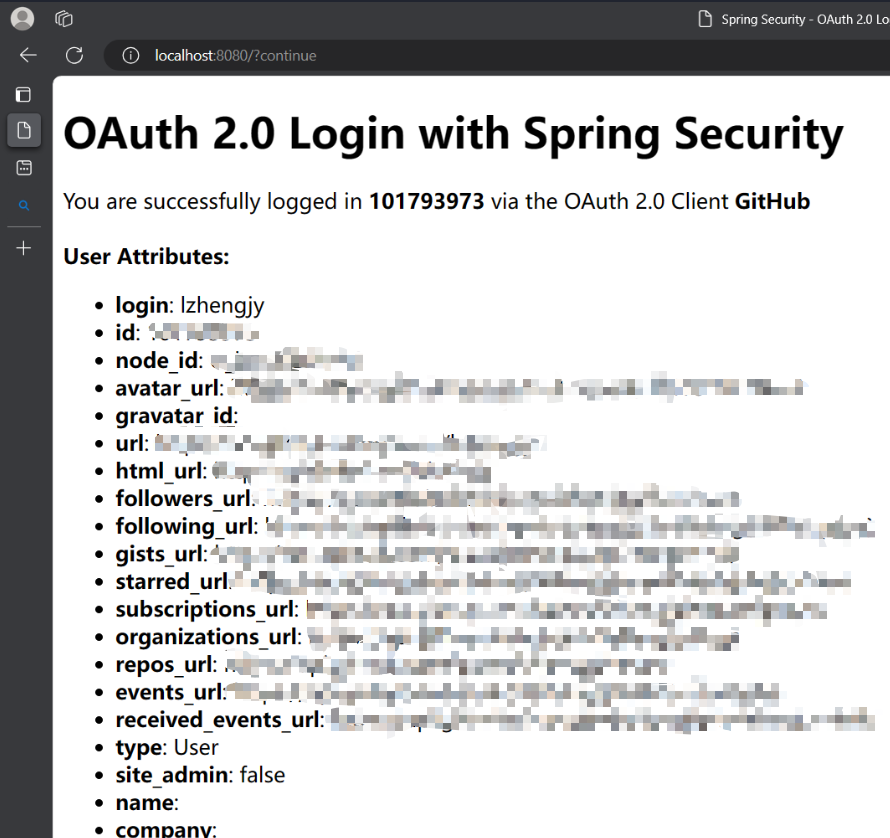
登录成功后会获取相关信息
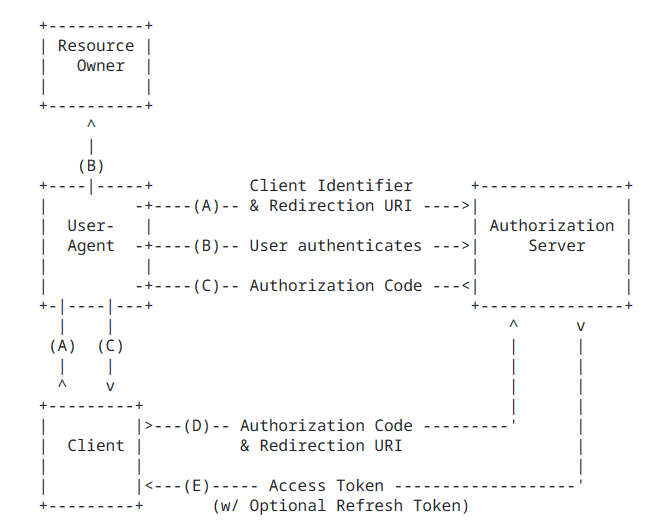
登录流程
- A 网站让用户跳转到 GitHub,并携带参数ClientID 以及 Redirection URI。
- GitHub 要求用户登录,然后询问用户”A 网站要求获取用户信息的权限,你是否同意?”
- 用户同意,GitHub 就会重定向回 A 网站,同时发回一个授权码。
- A 网站使用授权码,向 GitHub 请求令牌。
- GitHub 返回令牌.
- A 网站使用令牌,向 GitHub 请求用户数据。
- GitHub返回用户数据
- A 网站使用 GitHub用户数据登录
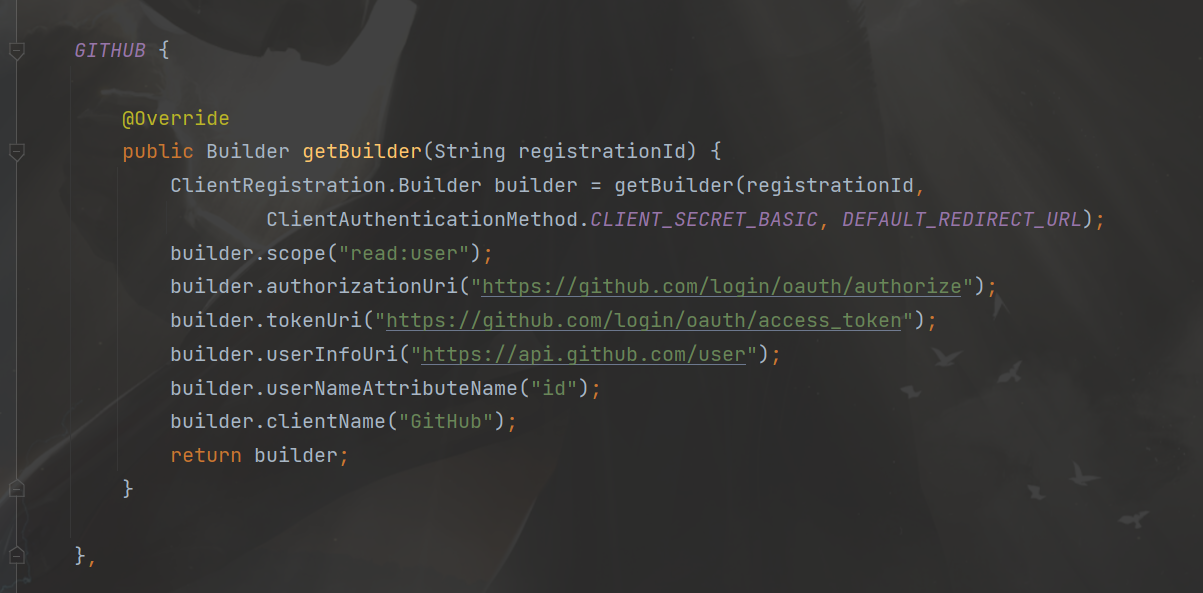
CommonOAuth2Provider
CommonOAuth2Provider是一个预定义的通用OAuth2Provider,为一些知名资源服务API提供商(如Google、GitHub、Facebook)预定义了一组默认的属性。
例如,授权URI、令牌URI和用户信息URI通常不经常变化。因此,提供默认值以减少所需的配置。
因此,当我们配置GitHub客户端时,只需要提供client-id和client-secret属性。
1
2
3
4
5
6
7
8
9
10
11
12
13
14
15
16
17
18
19
20
21
22
| GITHUB {
public ClientRegistration.Builder getBuilder(String registrationId) {
ClientRegistration.Builder builder = this.getBuilder(
registrationId,
ClientAuthenticationMethod.CLIENT_SECRET_BASIC,
"{baseUrl}/{action}/oauth2/code/{registrationId}");
builder.scope(new String[]{"read:user"});
builder.authorizationUri("https://github.com/login/oauth/authorize");
builder.tokenUri("https://github.com/login/oauth/access_token");
builder.userInfoUri("https://api.github.com/user");
builder.userNameAttributeName("id");
builder.clientName("GitHub");
return builder;
}
},
|